
I’ve been using this tweak for almost a month now and it’s definitely not new but I think posting it here would definitely be helpful if you haven’t been using it. As with all free browsing tricks, there’s a possibility that it may stop working soon and if you got here via google and the settings below ain’t no longer working, I suggest you check our web forum for updates. This Freedom settings on Glo might not be so fast if you’re not in a 3G coverage area but it’s not so bad on EDGE either.
Download OpenVPN 2.1.4
Be sure you download OpenVPN 2.1.4 because it seems like the stable version that works quite alright on Windows 7 unlikke ither versions. You can download the latest YF client but I’m presently using version 20111213-03.
1. Install both Your Freedom and OpenVPN Client
2. Run Your Freedom from the desktop
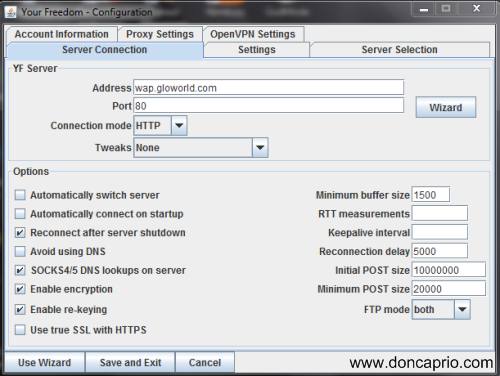
3. Click on Configure and enter the settings as shown in the screenshot below:
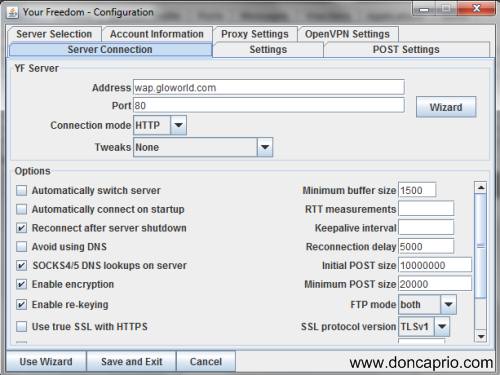
Address: wap.gloworld.com
Port: 80
Connection Mode: HTTP
Tweak: None
Enter other parameters as shown in the image above.
If you’re connecting from a different country, you need to change wap.gloworld.com to any free site on your network, perhaps a free homepage or something.
4. Click the “Proxy Settings” tab and fill it as shown below:
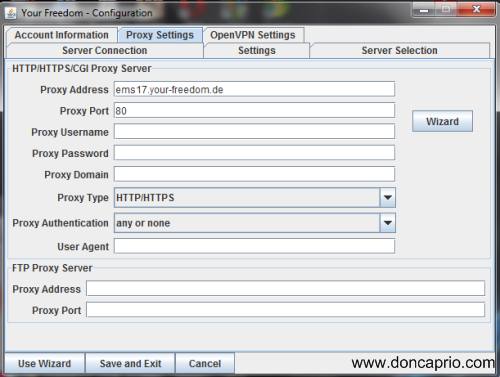
Proxy Address: ems17.your-freedom.de
Port: 80
For proxy address, you can use other freedom servers like ems01.your-freedom.de, ems25.your-freedom.de instead of the one I wrote there.
5. Select “Account Information” tab and enter your username and password. If you don’t have any login details to key in here, go to www.your-freedom.net and register. You need to verify your email before your account becomes active.
6. Hit the “Save and Exit ” button. Now click on the “Ports” tab and check these boxes:
– Socks 4/5
– Web Proxy
– Use UDP for OpenVPN
– OpenVPN
7. Now go back to the “Status” tab and click on “Start Connection”
You should be connected in no time. Your Freedom door icon opens when your connected and the red exclamation mark disappears. You have to wait for about a minute before OpenVPN starts. As soon as OpenVPN starts, the door icon opens a bit further.
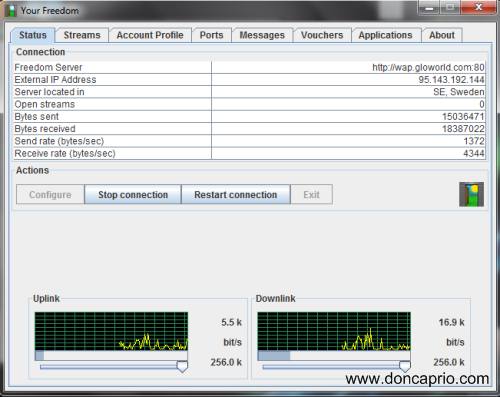
As soon as the icon changes, start surfing the net.
NOTE: There are times when OpenVPN won’t start and you may change your server under proxy settings if this happens. Also, Your Freedom only gives you 15 hours of connection per week and I think you have a maximum connection time of 6 hours daily. Upgrading your account gives you more connection and as you can see in the image above, a better bandwidth. You can do that by logging in to your freedom account on their website and clicking on the Account link at the top.
I’ve been using this for almost a month now and like I said earlier, it may stop working anytime soon. If it does, please check www.9jaclub.com for updates.
Say thanks by sharing the post!



Comments
16 responses to “Your Freedom Client Settings on Glo Nigeria (with OpenVPN)”